Settings
The Settings button opens the editor's settings panel.
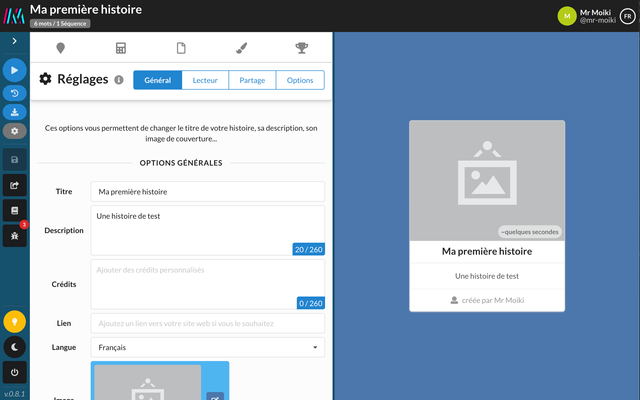
Editor settings panel.
The interface is divided into two areas. The right part is a visual preview of the story card, as it appears on the Social Club. The left part is used to modify different options grouped into four tabs :
General
From this screen, you can modify the title, description, cover image, etc. of your story.
Reader
Here are grouped the different options of the story reader. From this screen, you can allow (or not) backward navigation, decide to display (or not) the number of sequences viewed / total, etc.
Sharing
This screen currently has only one option. This allows you to generate a link to share access to the editor in read-only mode.
Options
Here are grouped the different options of the editor.
From this screen, you can duplicate or delete your story. You can also switch the editing mode: simplified to normal, or normal to expert.