Actions
Actions are mechanisms triggered when the player exits a sequence.
They allow for modifying the game's state, thus influencing the story's progress. You can add up to 5 actions per sequence or choice.
Add an Action
To add an action to a sequence or choice, start by clicking on the Action button in the editor's panel. A modal window will then open, allowing you to select the type of action and define its parameters.
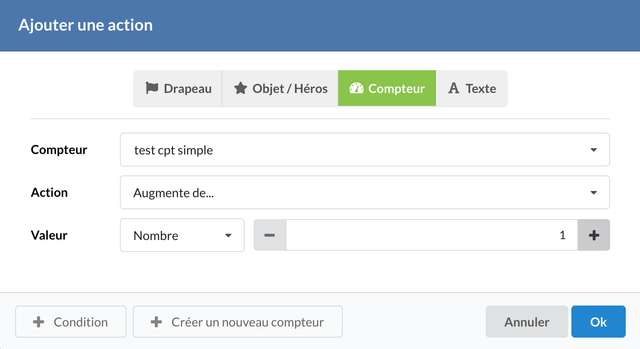
Example of adding a counter type action.
Types of Actions
Actions can be of several types, each allowing for modification of different aspects of the narrative.
Flag Actions
Flags are boolean variables that can either be true or false. Actions related to flags allow you to:
- Change value to...: Changes a flag's value. The new value can be
true,false, a random value (to simulate a coin flip), or even the value of another flag. - Toggle value of...: Toggles the current value of a flag, either the same flag or another.
Item / Hero Actions
Actions on items or heroes allow managing the player's inventory. You can:
- Gain an item: Adds an item to the player's inventory. If the player already possesses this item, the action will have no effect.
- Lose an item: Removes an item from the player's inventory. If the player does not possess the item, the action will have no effect.
- Gain or lose an item: Adds the item if the player does not possess it, otherwise, it is removed.
Counter Actions
Counters are numerical variables that can be manipulated by the following actions:
- Change value to...: Sets the counter's value to a specific number, to the value of another counter, or to a random value.
- Increase by... or Decrease by...: Increments or decrements the counter's value by a specific number or by the value of another counter.
Text Variable Actions
Text variables are character strings. Only the Change value action is available for them, with the following options:
- By value: Selects a value directly from those defined.
- By counter index: Chooses a value based on a counter's index. If the index does not exist, the first value in the list will be chosen.
- Random: Chooses a random value from those defined.

Sequence with an action.
Managing Actions
Once actions are added to a sequence, you can reorganize them by dragging them using the circular handle located to the left of each action.
Actions will execute in the order they are listed.